Four useful things to pin
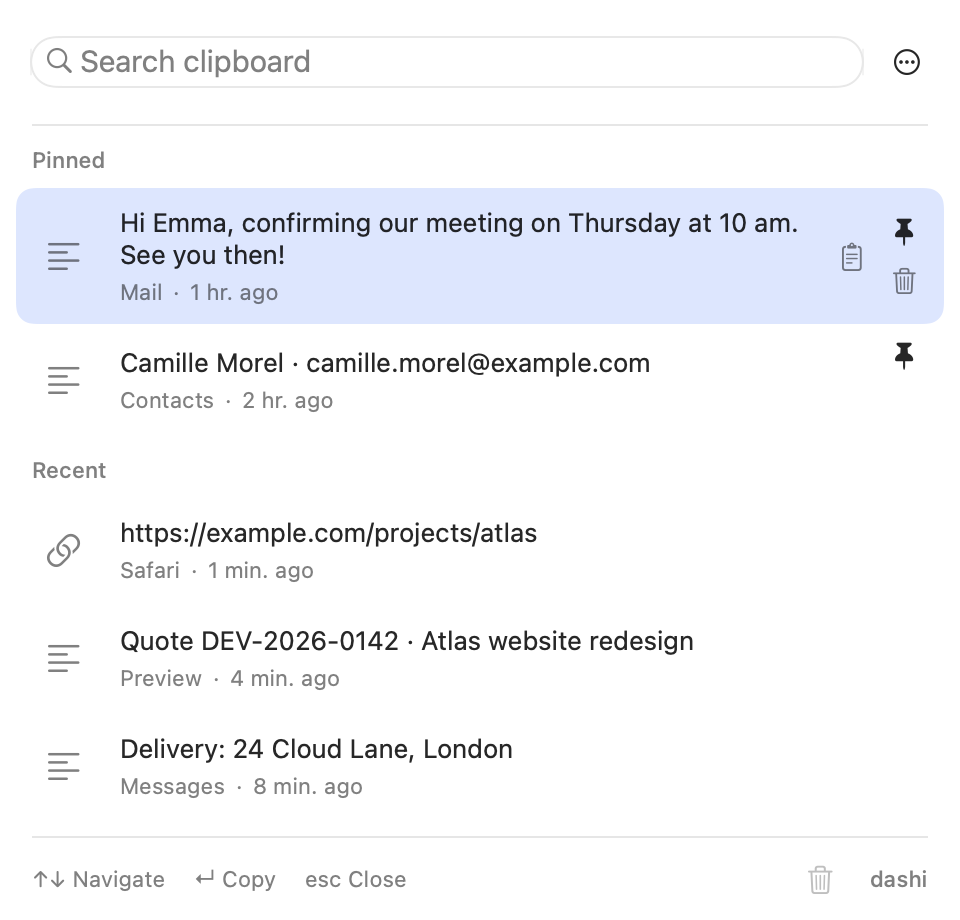
- A familiar reply: acknowledge a request, explain a quote deadline or offer meeting instructions.
- A work link: a project brief, shared folder or reference document.
- Contact details: a work email or delivery address you use often.
- An active reference: a quote number or case ID for your current work.
Do not pin passwords, sign-in codes, API keys or material that would cause harm if shared. Encrypted history does not turn a clipboard manager into a password vault.
Pin, find and paste
- Copy the content from its original app with ⌘C.
- Open Dashi with ⇧⌘V and click the row’s pin. You can also press ⌘P for the selected item.
- Later, search for a word in the content or choose it from pinned items.
- Press Return to copy it, then ⌘V in the destination app.
You reuse the recorded content. Dashi does not update a saved quote or link when its original document changes.
Make a reusable reply safe to reuse
Camille Morel keeps this reply: “Thanks for approving the project. I’ll send your quote within 24 hours.” She pastes it into an email to Emma Laurent, then checks that the promised deadline still makes sense.
Keep personal greetings outside a reply intended for several recipients. Check dates, amounts and commitments before sending. Dashi does not personalize the text or send the message. These fictional people illustrate a workflow, not an automated customer-service feature.
A pin is still a copy, not a backup
Pinned entries are exempt from automatic age-based cleanup and are not automatically evicted to reclaim storage. Clearing recent items preserves pins. Deleting an individual entry removes it, and Clear Everything also removes pins after confirmation.
If pinned content prevents Dashi from meeting its storage limit, new copies can be refused rather than removing those pins. Review your list occasionally. Keep contracts, billing documents and original files in the applications or storage systems intended for them.
When a proper document is the better choice
If a response needs a title, multiple versions, editable fields or collections, use an appropriate writing tool. The current Dashi version does not offer an editable snippets library. Pins do a simpler job: find and reuse something already copied.
Before reusing a saved link or reference, check that it still points to the right project. A short, maintained list is more useful than treating clipboard history as a document database.
A common question
Can I rename or edit a pinned snippet in Dashi?
Not in the current version. Edit the content in its original app, copy the updated version and pin it if needed. Remove the obsolete copy so you do not accidentally use it again.
Sources and product behavior
Dashi behavior described here applies to the current version for macOS 14 or later. Example people and projects are fictional.